Improving Code Quality During Data Transformation with Polars
Boost readability, maintainability and performance in your data transformations with Polars


Originally published on Medium → read here
In our daily lives as Data/Analytic Engineers, writing ETL/ELT workflows and pipelines (or perhaps your company uses a different term) is a routine and integral part of our work. However, in this article, I will focus only on the Transformation stage. Why? Because at this stage, data from various sources and of different types acquires business significance for the company. This stage is very important and also incredibly delicate, as an error can instantly mislead the user, causing them to lose trust in your data.
To illustrate the process of improving code quality, let’s consider a hypothetical example. Imagine a website where we log user actions, such as what they viewed and purchased. We’ll have user_id for the user ID, product_id for the product, action_type for the type of action (either a view or purchase), and action_dt for the action timestamp.
The full code for exploration and execution is available → here
from dataclasses import dataclass
from datetime import datetime, timedelta
from random import choice, gauss, randrange, seed
from typing import Any, Dict

import polars as pl

seed(42)
base_time = datetime(2024, 8, 9, 0, 0, 0, 0)
user_actions_data = [
{
"user_id": randrange(10),
"product_id": choice(["0001", "0002", "0003"]),
"action_type": ("purchase" if gauss() > 0.6 else "view"),
"action_dt": base_time - timedelta(minutes=randrange(100_000)),
}
for x in range(100_000)
]
user_actions_df = pl.DataFrame(user_actions_data)Additionally, for our task, we’ll need a product catalog, which in our case will include only product_id and its price (price). Our data is now ready for the example.
product_catalog_data = {”product_id”: [”0001”, “0002”, “0003”], “price”: [10, 30, 70]}
product_catalog_df = pl.DataFrame(product_catalog_data)
Now, let’s tackle our first task: creating a report that will contain the total purchase amount and the ratio of the number of purchased items to viewed items from the previous day for each user. This task isn’t particularly complex and can be quickly implemented. Here’s how it might look using Polars:
yesterday = base_time - timedelta(days=1)
result = (
    user_actions_df.filter(pl.col(”action_dt”).dt.date() == yesterday.date())
    .join(product_catalog_df, on=”product_id”)
    .group_by(pl.col(”user_id”))
    .agg(
        [
            (
                pl.col(”price”)
                .filter(pl.col(”action_type”) == “purchase”)
                .sum()
            ).alias(”total_purchase_amount”),
            (
                pl.col(”product_id”).filter(pl.col(”action_type”) == “purchase”).len()
                / pl.col(”product_id”).filter(pl.col(”action_type”) == “view”).len()
            ).alias(”purchase_to_view_ratio”),
        ]
    )
    .sort(”user_id”)
)
This is a working solution that could be deployed to production, some might say, but not us since you’ve opened this article. At the beginning, I emphasized that I would focus specifically on the transformation step.
If we think about the long-term maintenance of this code, testing, and remember that there will be hundreds of such reports, we must recognize that each subsequent developer will understand this code less than the previous one, thereby increasing the chances of errors with every change.
I would like to reduce this risk, and that’s why I’ve come to the following approach:
Step 1: Let’s separate all the business logic into a distinct class, such as DailyUserPurchaseReport.
@dataclass
class DailyUserPurchaseReport:
Step 2: Let’s define the arguments this class should accept: sources - various sources we need for our work, and params - variable parameters that may change, in our case, this could be the report date.
@dataclass
class DailyUserPurchaseReport:

    sources: Dict[str, pl.LazyFrame]
    params: Dict[str, Any]
Step 3: Define a method that will perform the transformation, for example, execute.
@dataclass
class DailyUserPurchaseReport:

    sources: Dict[str, pl.LazyFrame]
    params: Dict[str, Any]

    def execute(self) -> pl.DataFrame:
        pass
Step 4: Break down the entire process into separate functions that accept a pl.LazyFrame and also return a pl.LazyFrame.
@dataclass
class DailyUserPurchaseReport:

    sources: Dict[str, pl.LazyFrame]
    params: Dict[str, Any]

    def _filter_actions_by_date(self, frame: pl.LazyFrame) -> pl.LazyFrame:
        pass

    def _enrich_user_actions_from_product_catalog(self, frame: pl.LazyFrame) -> pl.LazyFrame:
        pass

    def _calculate_key_metrics(self, frame: pl.LazyFrame) -> pl.LazyFrame:
        pass

    def execute(self) -> pl.DataFrame:
        pass
Step 5: Now, use the magic function pipe to connect our entire pipeline together. This is precisely why we use pl.LazyFrame everywhere:
    def execute(self) -> pl.DataFrame:
        result: pl.DataFrame = (
            self.sources[”user_actions”]
            .pipe(self._filter_actions_by_date)
            .pipe(self._enrich_user_actions_from_product_catalog)
            .pipe(self._calculate_key_metrics)
            .collect()
        )
        return result
It is recommended to use LazyFrame when piping operations, in order to fully take advantage of query optimization and parallelization.
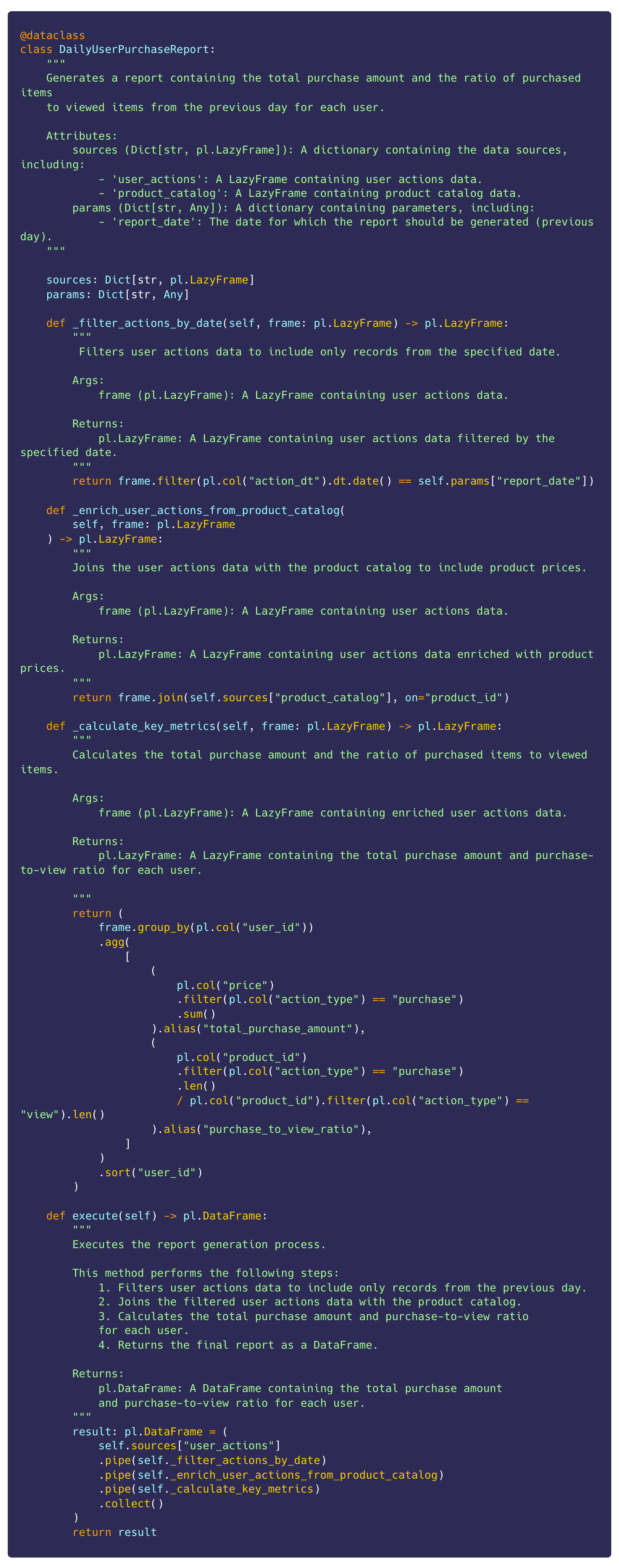
Final code:
Let’s check the execution:
# prepare sources
user_actions: pl.LazyFrame = user_actions_df.lazy()
product_catalog: pl.LazyFrame = product_catalog_df.lazy()

# get report date
yesterday: datetime = base_time - timedelta(days=1)

# report calculation
df: pl.DataFrame = DailyUserPurchaseReport(
    sources={”user_actions”: user_actions, “product_catalog”: product_catalog},
    params={”report_date”: yesterday},
).execute()
Result:
┌─────────┬───────────────────────┬────────────────────────┐
│ user_id ┆ total_purchase_amount ┆ purchase_to_view_ratio │
│ ---     ┆ ---                   ┆ ---                    │
│ i64     ┆ i64                   ┆ f64                    │
╞═════════╪═══════════════════════╪════════════════════════╡
│ 0       ┆ 1880                  ┆ 0.422018               │
│ 1       ┆ 1040                  ┆ 0.299065               │
│ 2       ┆ 2220                  ┆ 0.541667               │
│ 3       ┆ 1480                  ┆ 0.436782               │
│ 4       ┆ 1240                  ┆ 0.264463               │
│ 5       ┆ 930                   ┆ 0.254717               │
│ 6       ┆ 1080                  ┆ 0.306122               │
│ 7       ┆ 1510                  ┆ 0.345133               │
│ 8       ┆ 2050                  ┆ 0.536842               │
│ 9       ┆ 1320                  ┆ 0.414414               │
└─────────┴───────────────────────┴────────────────────────┘
Bonus
For those using Test-Driven Development (TDD), this approach is especially beneficial. TDD emphasizes writing tests before the actual implementation. By having clearly defined, small functions, you can write precise tests for each part of the transformation process, ensuring that each function behaves as expected. This not only makes the process smoother but also ensures that your transformations are thoroughly validated at each step.
Conclusion
In this article, I have outlined a structured approach to improving code quality in your data workflows using Polars. By isolating the transformation step and breaking down the process into distinct, manageable parts, we ensure that our code is both robust and maintainable. Through the use of pl.LazyFrame and the pipe function, we take full advantage of Polars capabilities for query optimization and parallelization. This method not only enhances the efficiency of our data transformations but also ensures the integrity and business relevance of the data we work with. By following these steps, you can create more reliable and scalable data workflows, ultimately leading to better data-driven decision-making.